January 27, 2026
AI Action Figure Generator: Turn Yourself Into a Toy (2026)
Turn any photo into a custom AI action figure. Free tools, best prompts, and step-by-step guide to creating viral toy box images.
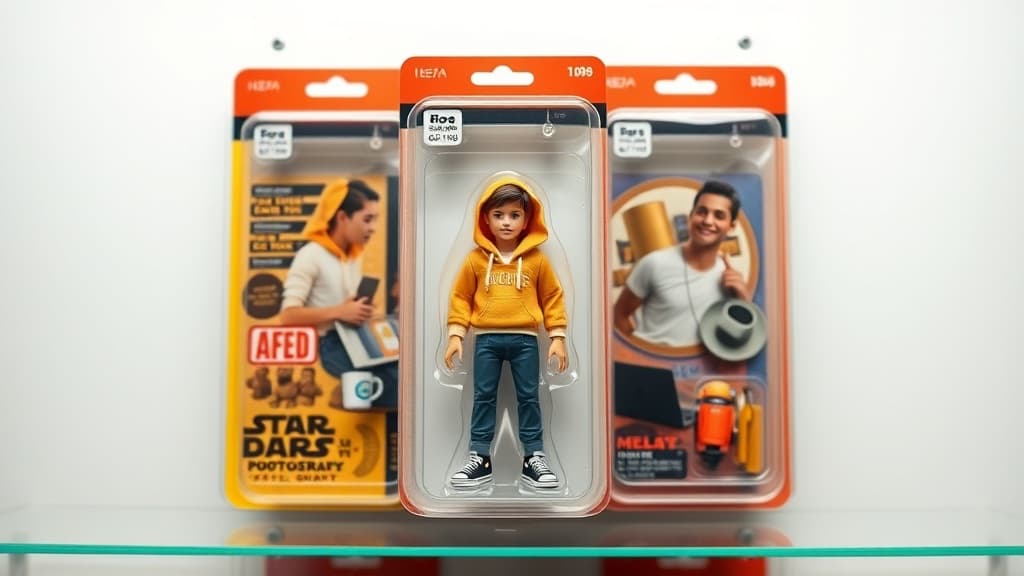
You've probably seen them already. Your LinkedIn feed, Instagram stories, group chats — everyone's turning themselves into action figures. Little plastic versions of themselves, sealed in blister packs with tiny accessories that somehow nail their entire personality.
A software engineer with a miniature laptop and a coffee mug. A yoga teacher with a rolled-up mat and a smoothie. A dad with a spatula and a "World's Okayest Griller" apron.
It's goofy. It's weirdly personal. And it's stupidly easy to make.
Here's how the whole AI action figure generator trend works, the best tools to use, and the exact prompts that'll get you the best results.
Why Did AI Action Figures Go Viral?
The trend kicked off in late 2025 when people started using AI image generators to create toy-box-style portraits of themselves. The format hit a sweet spot: it's funny, shareable, and just personal enough that everyone wants their own.
Unlike most AI image trends that burn out in a week, this one stuck around. The reason is simple — every person's action figure is different. Your accessories, your outfit, your box text. It's a template that never gets stale because it's always about you.
Brands jumped on it too. Companies started making action figures of their entire team for social media. Couples made matching sets. Pet owners (obviously) turned their dogs into chew-toy-sized heroes.
Best AI Action Figure Generators in 2026
Not every AI image tool handles this well. You need a model that understands product photography, plastic textures, and toy packaging. Here's what actually works:
Myjourney
Myjourney handles the action figure look really well out of the box. The Flux models it runs are strong at product-style images — shiny plastic skin, blister pack reflections, printed cardboard backing. You don't need to fight the model to get that toy feel.
It's free to start, runs fast, and you can iterate on prompts without burning through credits. If you want to browse what others have made, check the explore gallery for inspiration.
ChatGPT (GPT-4o)
OpenAI's image generation can produce solid action figure images. The quality is good, but you're limited on free-tier generations and the turnaround is slower. It tends to go more "artistic" than "product photo" unless you're very specific in your prompt.
Midjourney
Midjourney v6 handles toy aesthetics decently, but the Discord-based workflow is clunky for iterating quickly. You'll spend more time tweaking than generating.
Stable Diffusion (Local)
If you've got a GPU and some patience, SDXL with the right LoRA can produce excellent results. The barrier is setup time — expect an afternoon before you're generating anything.
Step-by-Step: Make Your Own AI Action Figure
Let's walk through the process using Myjourney. Same general approach works with other tools — the prompts are what matter.
Step 1: Decide Your Character
Before you touch any tool, figure out your "action figure identity." What accessories define you? What would your box say?
Think about:
- Your job or main hobby (this drives the accessories)
- 2-3 small items that represent you
- A funny tagline for the box
Step 2: Write Your Prompt
Here's where most people mess up. A vague prompt gives you a vague result. You want to be specific about the format, not just the person.
Basic prompt template:
Action figure in sealed blister pack packaging, [your description] as a plastic toy,
wearing [outfit], accessories include [item 1], [item 2], [item 3].
Printed cardboard backing with "[NAME]" in bold text.
Product photography, studio lighting, white background.
Example — Software Developer:
Action figure in sealed blister pack packaging, young man with glasses and messy hair
as a plastic toy, wearing a black hoodie and jeans, accessories include a tiny silver
laptop, a coffee mug that says "works on my machine", and a rubber duck. Printed
cardboard backing with "THE DEVELOPER" in bold retro text. Product photography,
studio lighting, white background.
Example — Fitness Instructor:
Action figure in sealed blister pack packaging, athletic woman with a ponytail as a
plastic toy, wearing neon green sports bra and leggings, accessories include a tiny
kettlebell, a protein shaker, and wireless earbuds. Printed cardboard backing with
"IRON QUEEN" in bold metallic text. Product photography, studio lighting, bright
colorful background.
Example — Cat Dad:
Action figure in sealed blister pack packaging, bearded man in a flannel shirt as a
plastic toy, accessories include a tiny orange tabby cat, a lint roller, and a bag of
cat treats. Printed cardboard backing with "CAT DADDY" in playful text with paw
prints. Product photography, studio lighting, pastel background.
Step 3: Generate and Iterate
Drop your prompt into Myjourney and hit generate. Your first result probably won't be perfect — that's normal. Look at what's off and adjust:
- Text looks garbled? AI still struggles with text. Try shorter names or simpler fonts. Adding "clean readable text" to your prompt sometimes helps.
- Accessories are wrong? Be more specific. Instead of "laptop," try "tiny silver MacBook-style laptop, closed."
- Doesn't look plastic enough? Add "glossy plastic skin texture, injection molded toy, articulated joints" to your prompt.
- Packaging looks off? Specify "retail toy packaging, clear plastic blister pack on printed cardboard" to push it toward that authentic toy-aisle feel.
Generate 3-4 variations and pick the best one. It usually takes 2-3 rounds of tweaking to land something great.
Step 4: Share It
The action figure format works everywhere. It's perfect for:
- LinkedIn (surprisingly — it humanizes your profile)
- Instagram stories and posts
- Slack/Teams profile photos
- Dating app conversation starters (seriously)
- Holiday cards (make the whole family)
Advanced Tips
Go retro. Adding "1990s Kenner toy style" or "vintage 1980s action figure packaging" gives it that nostalgic GI Joe / Star Wars feel that people love.
Make a series. Create your whole friend group or team as a matching set. Same packaging style, different characters. This is what makes it blow up on social media.
Add a barcode and age rating. Toss in "includes printed barcode, age rating 4+, and small parts warning on box" for extra realism. The tiny details sell it.
Use reference images. If your tool supports image-to-image (Myjourney does — check the guide for beginners), upload a photo of yourself and combine it with the action figure prompt. The likeness improves dramatically.
Try different scales. Not everything has to be 6-inch scale. Try "12-inch premium collector's edition" or "tiny 2-inch gashapon capsule toy" for different vibes.
What About Using Your Actual Photo?
Some tools let you upload a reference photo and generate an action figure that looks like you specifically. The results vary. Faces are the hardest part — sometimes you'll get a plastic figure that's clearly you, and sometimes it's a stranger in your outfit.
If face accuracy matters, your best bet is to use a tool that supports face reference or train a custom model. For most people, though, a description-based prompt that captures your vibe (hair color, build, outfit style) is close enough — and honestly funnier.
How Much Does It Cost?
Most AI action figure generators are free to try. Myjourney gives you free generations to start, and paid plans are affordable if you want more — check the pricing page for details. ChatGPT's free tier includes a handful of image generations. Midjourney starts at $10/month.
You don't need to pay anything to make your first action figure. Just pick a tool and start prompting.
FAQ
Can I sell AI-generated action figures?
You can sell the images (prints, stickers, social media content) as long as the tool's terms allow commercial use. Actually manufacturing a physical toy from an AI image is a whole different process — you'd need to model it in 3D and find a manufacturer. The images themselves are usually fine for personal and commercial use.
How do I get text on the box to look right?
AI models still struggle with text rendering. Keep it short — one or two words max. Use all caps in your prompt and add "clean, legible, printed text" as a modifier. If the text still comes out garbled, generate without text and add it in Canva or Photoshop afterwards. Takes 30 seconds.
Can I make an action figure of someone else?
Technically yes, but be thoughtful about it. Making an action figure of a friend as a gift? Fun. Making one of a celebrity or someone who hasn't consented? Gets into murky territory. Most AI tools prohibit generating images of real public figures. Stick to yourself, friends (with permission), and fictional characters.
What image size should I use?
Portrait orientation (3:4 or 2:3) works best since action figure boxes are vertical. If you want to show the figure laid flat on a surface — like a product photo on a shelf — landscape (16:9) works too. Square crops well for Instagram and profile photos.
Ready to try it yourself?
Create AI images and videos with Myjourney. 100 free credits, no credit card needed.
Related posts

How to Use AI Image Generation: A Beginner's Complete Guide (2026)
Step-by-step guide to using AI image generation tools in 2026. From your first prompt to advanced techniques — everything you need to start creating AI art today.
The First Draft That Actually Feels Right
A fast, repeatable workflow for turning a rough idea into an image you want to keep without losing the spark.
Liked this post?
Get notified when we publish new guides, tips, and comparisons. No spam.