January 27, 2026
AI Headshot Generator: Get a Professional Photo Without the Photoshoot
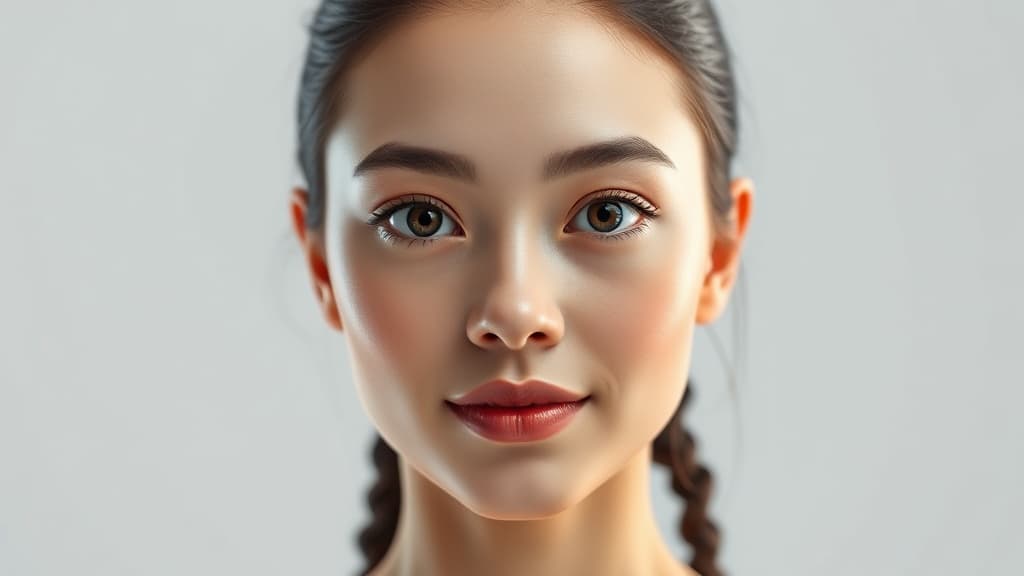
A professional headshot costs $150 on the low end. In a major city, expect $250-400 for a session with outfit changes, retouching, and a handful of final images. Then add the time — scheduling, traveling to the studio, sitting through 45 minutes of "turn your chin slightly left."
AI headshot generators skip all of that. Upload a few selfies, describe what you want, and get a professional-looking result in under a minute.
But "professional-looking" and "actually professional" aren't always the same thing. Let's talk about when AI headshots work, when they don't, and how to get the best results.
Who AI Headshots Are For
Job seekers updating LinkedIn. You need a headshot. You need it today. You don't have $200 or two weeks to schedule a photographer. An AI headshot gets you from "no photo" or "cropped party photo" to "looks like a professional" in minutes.
Startup teams. You've got 8 people on the team page and everyone submitted different quality photos. Some are selfies, one is clearly from 2017, and your CTO sent a photo of himself holding a fish. AI headshots can create a consistent, professional look across the whole team.
Freelancers and consultants. You need headshots for your website, proposals, and speaker profiles. But you change your look — new glasses, different hairstyle — every few months. Re-generating an AI headshot takes 30 seconds. Re-booking a photographer takes 30 days.
Real estate agents, insurance brokers, anyone with a face on a business card. You need volume. Multiple poses, multiple backgrounds, seasonal updates. At $0.03 per image, you can generate 100 variations for $3.
How AI Headshots Work
Most AI headshot tools follow the same basic process:
- You upload 5-15 reference photos of yourself
- The AI learns your facial features
- You describe the output you want (or pick a style)
- The model generates new images of "you" in professional settings
The quality depends heavily on your reference photos. Good input = good output. Blurry selfies = blurry headshots.
Some platforms — like Myjourney — let you generate portraits from text prompts without uploading reference photos. You won't get your face, but you'll get a realistic professional headshot that works for placeholder team pages, marketing mockups, or anonymous profiles.
The Competitors, Honestly
HeadshotPro ($29 for 120 headshots) is probably the most popular dedicated tool. Quality is consistently good. The process takes about 2 hours because they batch-train a model on your photos. Results look polished but sometimes a bit too polished — that airbrushed quality that screams "this isn't real."
Aragon AI ($29 for 40 headshots) produces more natural-looking results. Less retouching, more realistic skin texture. Training takes about an hour. Good for people who want to look like themselves, not a smoother version of themselves.
DALL-E 3 can generate headshot-style images from text prompts. The faces are realistic but they won't be your face without fine-tuning. Quality is high, pricing through OpenAI's API runs about $0.04-0.08 per image depending on resolution.
Stable Diffusion with DreamBooth is the DIY option. Train a model on your photos locally, generate unlimited headshots for free (after the initial GPU time). The learning curve is steep — expect to spend a weekend getting it working. Results can be excellent if you know what you're doing.
What Makes a Good AI Headshot
After looking at thousands of AI-generated headshots (occupational hazard), here's what separates the good from the uncanny:
Lighting matters more than resolution. A well-lit AI headshot at standard quality beats a poorly-lit one at maximum resolution. When writing your prompt, specify lighting: "soft studio lighting from the left" or "natural window light" produces dramatically better results than leaving it to chance.
Simple backgrounds win. Solid colors, subtle gradients, or blurred office environments. The moment you ask for a complex background — bookshelves, city skyline, conference room — the AI splits its attention and the face quality drops.
Clothing should be boring. Dark blazer, simple shirt, minimal accessories. Every element the AI has to render competes for quality budget. A plain navy suit lets the model focus on getting your face right.
Eyes are the giveaway. Look at the eyes first. Mismatched reflections, slightly different sizes, or that vacant AI stare. If the eyes look right, the whole photo works. If they don't, nothing else matters.
Common Mistakes
Using too few reference photos. Five selfies from the same angle will produce headshots that only look right from that angle. Give the AI variety: different lighting, different angles, both with and without glasses if you wear them.
Over-prompting. "Professional headshot, studio lighting, slight smile" works better than "ultra-realistic 8K professional corporate executive headshot with volumetric god rays and bokeh background on Canon EOS R5 85mm f/1.4." The AI gets confused by kitchen-sink prompts.
Not checking at full resolution. AI headshots look great as thumbnails. Zoom in. Check the hairline, the ears, the teeth. Artifacts hide at small sizes and appear at print resolution.
The Real Cost Comparison
| Option | Cost | Time | Quality |
|---|---|---|---|
| Professional photographer | $150-400 | 1-3 weeks | Excellent |
| HeadshotPro | $29 | 2 hours | Very good |
| Aragon AI | $29 | 1 hour | Good-very good |
| Myjourney (text prompt) | $0.03/image | 30 seconds | Good |
| Myjourney (HD mode) | ~$0.06/image | 1 minute | Very good |
| DIY Stable Diffusion | Free (GPU time) | 1 weekend setup | Varies wildly |
The pricing difference is significant. For $1 on Myjourney, you can generate 30+ headshot variations and pick the best ones. That's less than a coffee.
When You Still Need a Photographer
AI headshots have limits. And being honest about them matters.
C-suite executives at public companies. The headshot will be scrutinized. Journalists will reverse-image-search it. Use a photographer.
Actors and models. Your headshot IS your product. AI can generate concepts and mood boards, but your final headshot should be an actual photo of your actual face.
Legal and medical professionals. Some industries have specific requirements about photo authenticity. Check before you publish an AI headshot on your professional profile.
When your look IS your brand. If clients hire you partly because of your personal style and presence, a real photo captures that. AI captures a plausible version of you, which isn't the same thing.
Getting Started
If you want a quick professional headshot without the overhead:
- Go to Myjourney's image generator
- Describe what you want: "professional headshot, man in navy suit, neutral gray background, soft studio lighting, slight smile"
- Generate a few variations at Standard quality ($0.03 each)
- Found a style you like? Re-generate at HD for the final version
- Download, crop, upload to LinkedIn
Total cost: probably under $0.50. Total time: about 5 minutes.
Not perfect for every situation. But for most people who just need a professional photo that doesn't look like a bathroom selfie? It's hard to beat. Browse the AI portrait gallery to see examples of what's possible.
Ready to try it yourself?
Create AI images and videos with Myjourney. 100 free credits, no credit card needed.
Related posts
From Prompt to Palette: A Color-First Guide
A practical way to steer mood and color without overstuffing your prompt.
Liked this post?
Get notified when we publish new guides, tips, and comparisons. No spam.