February 3, 2026
AI Product Photography: Studio-Quality Shots for $0.03 Each
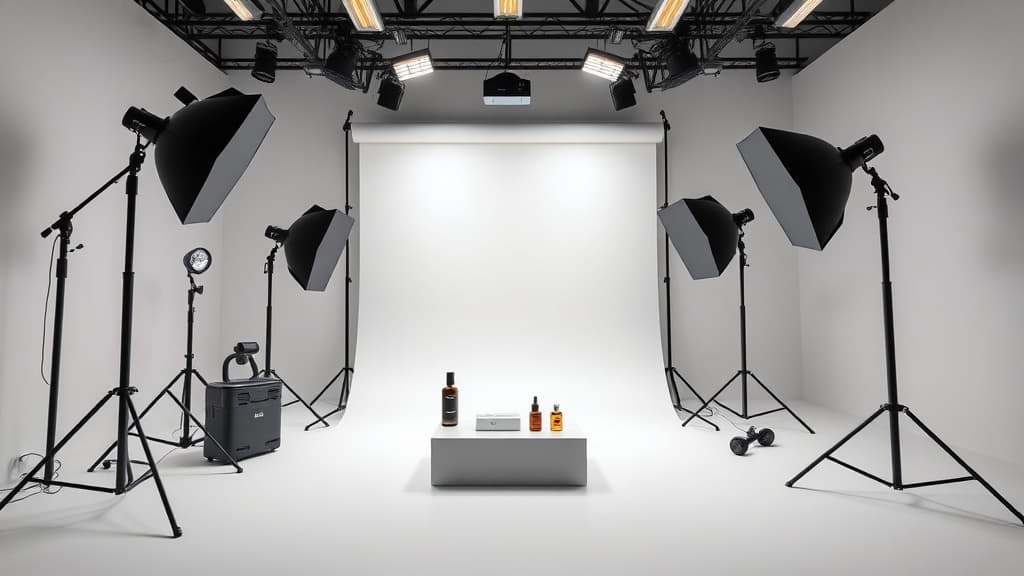
A single product photography session costs $200-500. That gets you a photographer, a studio, some lighting, and maybe 10-20 edited images. If you're selling candles on Etsy or launching a small jewelry line, that's a big chunk of your budget before you've sold anything.
AI product photography flips the economics. You can generate clean, studio-quality product images for $0.03-$0.10 each. No studio, no scheduling, no back-and-forth on edits.
This isn't hypothetical. Sellers are already using AI-generated product shots on Etsy, Amazon, and Shopify. Here's how to do it well.
What You Need to Get Started
You need two things: a decent reference photo of your product (even a phone photo works) and a text-to-image tool that handles photorealistic output.
The reference photo doesn't need to be perfect. Snap your product on a table with decent lighting — natural window light is fine. This gives the AI something to work with for shape, color, and proportions.
For the generation side, you want a tool that supports photorealistic styles and lets you control the output. Myjourney's Imagine tool works well here because you can dial in the exact style without fighting with complicated settings.
Prompts That Actually Work for Product Shots
The difference between a good AI product photo and a bad one is almost entirely in the prompt. Here are templates that consistently produce clean results:
Clean White Background (Amazon-style)
[your product] on a pure white background, studio product photography,
soft diffused lighting, high resolution, commercial photography,
no shadows, centered composition, 4K
Example: "Handmade ceramic mug with blue glaze on a pure white background, studio product photography, soft diffused lighting, high resolution, commercial photography, no shadows, centered composition, 4K"
This is your bread and butter. Amazon requires a white background for main listing images, and this prompt nails it about 80% of the time.
Lifestyle Context Shot
[your product] on [surface], [setting], natural lighting,
lifestyle product photography, shallow depth of field,
warm tones, editorial style
Example: "Soy candle in amber glass jar on a wooden shelf, cozy living room background, natural lighting, lifestyle product photography, shallow depth of field, warm tones, editorial style"
Lifestyle shots are where AI really shines. Staging a real lifestyle shoot means renting a space, buying props, and spending hours on setup. AI does it in seconds.
Flat Lay / Top-Down
[your product] arranged in flat lay composition, top-down view,
[complementary items], marble surface, soft natural light,
product photography, clean and minimal
Example: "Gold hoop earrings arranged in flat lay composition, top-down view, small succulent and linen fabric, marble surface, soft natural light, product photography, clean and minimal"
Flat lays work especially well for jewelry, skincare, stationery, and food products.
Hero Shot with Drama
[your product], dramatic studio lighting, dark background,
rim lighting, commercial advertisement photography,
high contrast, premium feel
This style works for products you want to position as premium — watches, leather goods, tech accessories, spirits.
Step-by-Step: Your First AI Product Photo
- Take a basic reference photo. Phone camera, daylight, plain background. Get the colors and proportions right.
- Open the Imagine tool and select a photorealistic model.
- Paste one of the prompt templates above, replacing the bracketed sections with your actual product details.
- Generate 4 variations. AI output is probabilistic — you'll want options.
- Pick the best one and tweak the prompt if needed. Maybe the lighting is too harsh or the angle is wrong. Small prompt changes make big differences.
- Download and crop to your marketplace's required dimensions (Amazon wants 1:1 at 2000×2000px minimum).
The whole process takes about 5 minutes per final image.
The Cost Math
Let's say you're launching 20 products on Etsy and want 5 images each. That's 100 product photos.
Traditional photography:
- Photographer session: $300-500
- Studio rental: $100-200
- Props and styling: $50-100
- Editing/retouching: $100-200
- Total: $550-1,000
- Timeline: 1-3 weeks
AI product photography:
- 100 generations at $0.03-$0.10 each: $3-$10
- Extra generations for variations: $2-$5
- Total: $5-$15
- Timeline: 1-2 hours
That's not a typo. The price difference is 50-100x.
Even if you generate 10 images for every one you keep (a realistic ratio while you're learning), you're still under $100 for your entire catalog.
When AI Product Photos Fall Short
Honesty time. AI product photography isn't perfect for everything:
Exact color matching. If you sell paint, fabric, or anything where exact color matters, AI will approximate but not match. You'll still need a real photo for color accuracy.
Complex products with fine details. Watches with tiny text on the dial, circuit boards, products with important fine print. AI sometimes fumbles small details.
Products that need to show scale. A photo of a backpack next to a person shows size. AI can do this, but it takes more prompting and the proportions can be off.
Marketplace compliance. Amazon's terms of service don't explicitly ban AI-generated images, but they do require images to "accurately represent the product." If your AI image looks materially different from the real product, you'll get flagged.
The move most sellers are making: use AI for lifestyle and secondary images, keep one or two real photos for your main listing image and any shots where accuracy matters.
Browse What's Possible First
Before you start generating, it helps to see what others have done. Check the Explore gallery to browse product photography styles and find prompts that match the look you're going for. Saves a lot of trial and error.
Getting Better Results Over Time
A few things I've learned from generating hundreds of product shots:
- Be specific about materials. "Ceramic mug" produces better results than "mug." "Brushed stainless steel water bottle" beats "water bottle."
- Name the lighting style. "Soft diffused lighting" and "dramatic rim lighting" produce very different moods. Don't leave it to chance.
- Mention the camera. Adding "shot on Canon EOS R5, 85mm lens" to your prompt pushes the output toward realistic photography rather than illustration.
- Iterate fast. Generate, evaluate, tweak one thing, generate again. Three rounds of iteration usually gets you something solid.
Start Generating
If you're spending hundreds on product photos for a small shop, AI is worth testing. Start with the Imagine tool, use the prompts above as starting points, and see how the output compares to what you're currently using.
For most Etsy and Shopify sellers, the quality gap between AI and professional photography has gotten small enough that the 50x cost difference is hard to ignore.
Ready to try it yourself?
Create AI images and videos with Myjourney. 100 free credits, no credit card needed.
Related posts

How to Use AI Image Generation: A Beginner's Complete Guide (2026)
Step-by-step guide to using AI image generation tools in 2026. From your first prompt to advanced techniques — everything you need to start creating AI art today.
The First Draft That Actually Feels Right
A fast, repeatable workflow for turning a rough idea into an image you want to keep without losing the spark.
Liked this post?
Get notified when we publish new guides, tips, and comparisons. No spam.