February 2, 2026
AI Pet Portrait Generator: Turn Your Pet Into Art (2026)
Turn your pet's photo into stunning AI art. Renaissance paintings, cartoon styles, and more. Free tools, best prompts, and a step-by-step guide.
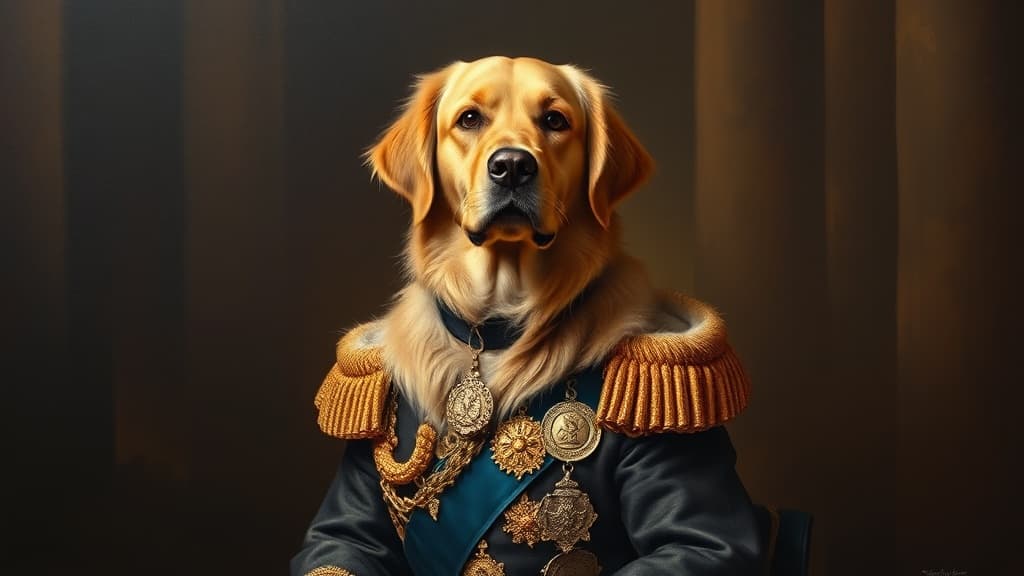
Your dog doesn't care about art. Your cat actively dislikes everything you do. But that hasn't stopped millions of pet owners from turning their animals into Renaissance nobles, anime characters, and watercolor masterpieces using AI.
And honestly? The results are kind of amazing.
AI pet portrait generators take a photo of your pet (or just a description) and turn it into custom artwork in seconds. No commission fees, no two-week wait, no back-and-forth with an artist about whether Baxter's ears are really that floppy. They are. He's perfect.
Here's how to make AI pet portraits that actually look good — the tools, the prompts, and the tricks that make the difference.
Why AI Pet Portraits Took Off
Custom pet portraits have always been popular. Etsy is full of artists charging $50-200 to paint your dog in a military uniform or your cat as a medieval king. People love it because it's personal, funny, and makes a great gift.
AI made it instant and free.
Instead of waiting two weeks and paying $100, you type a description, hit generate, and have a framed-worthy portrait in 30 seconds. The quality got good enough in 2025 that most people can't tell the difference between an AI pet portrait and a hand-painted one — at least at phone-screen resolution.
The styles that do best: Renaissance oil paintings, Studio Ghibli animation, watercolor, pop art, and "pet as a human professional" (your golden retriever in a business suit, your cat as a chef). Anything that takes a familiar animal and puts it somewhere unexpected.
Best AI Pet Portrait Generators
Myjourney
Myjourney is great for pet portraits because the Flux models handle fur textures, animal anatomy, and artistic styles really well. You can go from "my tabby cat as a Renaissance duke" to a finished portrait in under a minute. Browse the explore gallery to see what other people have generated — there's a surprising amount of pet content in there.
Free to start. Fast generations. Good at both photorealistic and stylized looks.
ChatGPT (GPT-4o)
GPT-4o produces beautiful pet portraits, especially in painterly styles. It's strong at interpreting creative prompts ("my poodle running through a field of sunflowers, impressionist style"). Limited free generations though, and it can be slow during peak hours.
Midjourney
Midjourney v6 is excellent at artistic styles. If you want something that looks like it belongs in a gallery, Midjourney's aesthetic bias works in your favor here. The Discord workflow is still annoying, but pet portraits are usually a one-and-done thing so it's less painful.
Stable Diffusion
Free, local, unlimited. SDXL with an animal-focused LoRA produces incredible results. You'll need a GPU and some technical comfort. If you're generating portraits for an entire shelter's worth of animals (some people do this), the zero-cost-per-image makes it worth the setup.
Step-by-Step: Generate an AI Pet Portrait
I'll walk through this using Myjourney, but the prompts work across any tool.
Step 1: Pick Your Style
This is the fun part. What vibe do you want?
- Renaissance / Classical — Your pet as royalty, in an oil painting with gold frame energy
- Watercolor — Soft, flowy, great for gifts and prints
- Studio Ghibli / Anime — Your pet in a Miyazaki film
- Pop Art — Bold colors, Warhol style
- Photorealistic fantasy — Your pet in a magical forest, wearing armor, riding a dragon
- Professional portrait — Your pet in human clothes, doing human things
Step 2: Describe Your Pet
AI can't see your pet (unless you upload a photo). So describe the important stuff:
- Breed or animal type
- Color and markings
- Size and build
- Any distinctive features (floppy ears, one blue eye, always looks grumpy)
The more specific you are, the closer it'll feel like your pet and not just a pet.
Step 3: Write Your Prompt
Here are tested prompts you can copy and customize:
Renaissance Royal Portrait:
Oil painting portrait of a [breed] [color] dog wearing an ornate royal military
uniform with gold epaulettes and medals, sitting regally on a velvet throne,
dark moody background, classical Renaissance painting style, dramatic side lighting,
craquelure texture on canvas
Studio Ghibli Style:
A fluffy [color] cat sitting on a mossy stone wall in a countryside village,
Studio Ghibli animation style, soft pastel colors, gentle sunlight, wildflowers
growing around the wall, whimsical and peaceful atmosphere, hand-drawn feel
Watercolor Portrait:
Watercolor painting of a [breed] dog with [color] fur, head tilted slightly,
soft wet-on-wet technique, paint bleeding at the edges, white paper showing through,
loose brushstrokes, warm golden tones, minimal background
Pet in a Human Job:
A [breed] [color] cat wearing a tiny white chef's hat and apron, standing at a
miniature kitchen counter, preparing a small fish dish, photorealistic, warm kitchen
lighting, shallow depth of field, editorial food photography style
Fantasy Adventure:
An epic portrait of a [breed] dog wearing leather armor and a small cape, standing
on a cliff overlooking a vast fantasy landscape at sunset, volumetric lighting,
dramatic clouds, cinematic composition, detailed fur texture
Step 4: Iterate on the Details
First generation might not be perfect. Common fixes:
- Wrong breed? Add more breed-specific details. "Corgi with short legs and large pointed ears" works better than just "corgi."
- Fur color is off? Be explicit: "cream and white fur with tan patches on the ears" beats "light colored."
- Style not strong enough? Double down on style keywords. For watercolor, add "visible brushstrokes, paint splatter, textured watercolor paper."
- Too cartoonish when you want realistic? Add "photorealistic, DSLR quality, 85mm lens, shallow depth of field."
Two or three rounds of tweaking usually gets you something worth printing.
What to Do With Your AI Pet Portrait
The image is just the start. Here's what people actually do with them:
Print and frame it. Services like Printful, Shutterfly, or your local print shop can turn a digital image into a canvas print, framed poster, or even a metal print. A 16x20 canvas print runs about $25-40. Makes an absurdly good gift.
Make it your everything. Phone wallpaper, desktop background, Zoom virtual background, social media profile pic. Commit to the bit.
Holiday cards. Your dog in a Santa hat, painted in watercolor, on a card that says "Happy Howlidays." People eat this up.
Memorial portraits. This is where AI pet portraits get genuinely meaningful. If you've lost a pet and don't have many good photos, AI can create a beautiful portrait from what you have. It won't be photographically accurate, but the emotional value is real.
Merch. Mugs, t-shirts, phone cases, stickers. If you've got a particularly good generation, throw it on a product. Your pet's face on a coffee mug never gets old.
Tips for Better Results
Upload a reference photo if your tool supports it. Description-only prompts produce generic-looking animals. A reference photo makes the output look like your specific pet. Myjourney supports image input — check the social media guide for tips on using reference images effectively.
Describe personality, not just appearance. "A grumpy-looking Persian cat" produces a more interesting portrait than "a Persian cat." The expression is half the portrait.
Match your prompt length to your style. Short prompts work for photorealistic styles (the model fills in natural details). Longer, more descriptive prompts work better for fantasy and artistic styles where you want to control the composition.
Try multiple animals together. If you've got two pets, put them both in the prompt. "A golden retriever and a black cat sitting side by side in matching royal outfits" produces adorable results. Adjust the composition if one animal keeps dominating the frame.
Use portrait orientation. 2:3 or 3:4 works best for pet portraits you plan to print. It feels like a real framed painting. Square works for social media. Landscape can work for action scenes or group portraits.
For more on getting the most out of AI image generation, check the beginner's guide and the art generation guide. And if you need more generations, Myjourney's pricing is pretty reasonable.
FAQ
Can I use AI pet portraits commercially?
In most cases, yes. Tools like Myjourney allow commercial use of generated images on paid plans. You can sell prints, put them on products, or use them in marketing. Check the specific tool's terms — most are permissive for commercial use, especially on paid tiers.
How accurate will the portrait be to my actual pet?
Without a reference photo: not very. The AI will generate a generic version of whatever breed you describe. With a reference photo: surprisingly close. It won't be pixel-perfect, but people will recognize their pet. Distinctive markings (spots, patches, heterochromia) help the AI a lot.
What's the best style for printing and framing?
Oil painting and watercolor styles print the best because they're forgiving at larger sizes. Photorealistic styles can look slightly off when blown up to poster size — any AI artifacts become more visible. For a 16x20 or larger print, go with a painterly style. For phone cases and mugs, anything works.
Are AI pet portraits disrespectful to real artists?
This comes up a lot. AI portraits serve a different market. Someone spending $5-15 on an AI generation probably wasn't going to commission a $150 hand-painted portrait anyway. Many pet portrait artists have actually started using AI as a starting point for their own work — generating a base composition and then painting over it. The hand-painted market hasn't disappeared; it's just not the only option anymore.
Ready to try it yourself?
Create AI images and videos with Myjourney. 100 free credits, no credit card needed.
Related posts

How to Use AI Image Generation: A Beginner's Complete Guide (2026)
Step-by-step guide to using AI image generation tools in 2026. From your first prompt to advanced techniques — everything you need to start creating AI art today.
The First Draft That Actually Feels Right
A fast, repeatable workflow for turning a rough idea into an image you want to keep without losing the spark.
Liked this post?
Get notified when we publish new guides, tips, and comparisons. No spam.